Best Shopify SEO Apps: Do You Actually Need One?
Most Shopify SEO apps aren’t worth your money.
(Ah, today I choose violence!)
Before you install another app, here’s what actually moves the needle for new and growing Shopify stores in 2026, and what you can skip entirely.
My friend, I’m not the biggest fan of most Shopify SEO apps, especially for newer/smaller/less established/less marketing-savvy stores.
(Kai Davis ⚡ I zag where other consultants zig!)
You see, most Shopify SEO apps… aren’t that great.
You’re buying an over-inflated list of “all-in-one! done while you sleep! now with AI ✨!” features, a hyped-up list of benefits, and then they just spit out the same tired inactionable warnings you’ve seen and read about before, like:
⚠️ Low text to HTML ratio
Or,
🚨 Duplicate meta descriptions!
Alas, these insights are rarely, if ever, worth the time, attention, and money you’re spending on that Shopify SEO app. Or the time, attention, and money you’re spending on fixing them.
And here’s the thing that’s changed since I first wrote this: the app store is more crowded than ever, and the marketing is louder than ever. There are dozens of ‘SEO suites’ now, plus big familiar names like Yoast that have landed on Shopify.
Louder marketing hasn’t changed the fundamental problem in this industry: an SEO app can do SEO hygiene and cleanup on your store, but they still can’t do the SEO work that actually grows your business and traffic.
Does Shopify have built-in SEO? (Mostly, yes.)
You might be paying a monthly fee to feel busy.
Before you buy any Shopify SEO App, you should know what you already have. (Spoiler: It’s probably more than you expect.)
Shopify as a platform and (many good) Shopify themes come with the technical SEO basics already handled:
- Editable SEO titles and meta descriptions
- Auto-generated sitemaps and robots.txt
- Canonical tags
- Essential structured data
- URL 301 redirects
- Mobile-friendly theme
And the main ‘issue’ that lots of influencers raise (non-canonical collection-relative URLs, like /collection/vintage-pop-compact-discs/products/tlc-fanmail/) is, at most, a technical annoyance, not a platform- or SEO-breaking issue.
You already probably have a good SEO foundation under your feet. But if you’re running a pre-Shopify-2.0 theme and/or haven’t updated your theme for a few years due to technical issues, you might have a pile of growing issues.
Most ‘SEO score’ apps are grading you on things Shopify already takes care of, or on things that don’t move rankings, or on out-of-date things that don’t matter anymore but they still say to fix.
My recommended apps + tooling for new stores
If you’re a new store on Shopify, there are a few (free!) tools and apps that I recommend.
While none of them are Shopify SEO apps, they’ll all help you do better Shopify SEO.
The most important things for you to install are:
- Google Search Console (Free). This is Google’s tool that, among many things, will tell you the keywords that your pages are ranking for in Google. That’s valuable to have!
- Google Analytics (Free). This is Google’s free analytics tool. Yes, there’s a lot to complain about with Google Analytics 4. It’s still a very useful tool to have on your site to understand where your traffic is coming from and what it’s doing once it lands there.
Every SEO Opportunity Report analysis I perform starts with the information in these two free tools. If you don’t have them, you’re missing out on free insights into your SEO performance.
Beyond that, for a newer or smaller store, there aren’t that many Shopify SEO apps that I recommend. Save your money, friend. Spend it elsewhere, not on $XX to $XXX/month SEO subscriptions. Go create content instead.
That’s not to say I’m against all apps! I just believe you should be cautious about what apps you install and pay for, especially when you’re a newer store.
The one app I’m a fan of: Ilana’s JSON-LD for SEO
I’m a huge fan of Ilana Davis’s JSON-LD for SEO. It’s the strongest dedicated structured-data app on Shopify I’ve seen, and it’s earned a 4.9-star rating across hundreds of reviews.
Shopify’s own team backs it up. In Shopify’s roundup of the best SEO apps, they list JSON-LD for SEO first, with this from Kyle Risley, Shopify’s senior SEO lead: there are a lot of apps that improve parts of your store’s structured data, but if you have complex needs you want to resolve once and for all, go with JSON-LD for SEO.
Structured data is also how you show up as those rich results in Google (the star ratings, prices, and FAQ snippets right in the search listing). And as more search happens through AI answers, clean structured data helps those systems intake information about your products, collections, and store and understand who you serve + what your products actually are. JSON-LD and structured data are a powerful lever for your store.
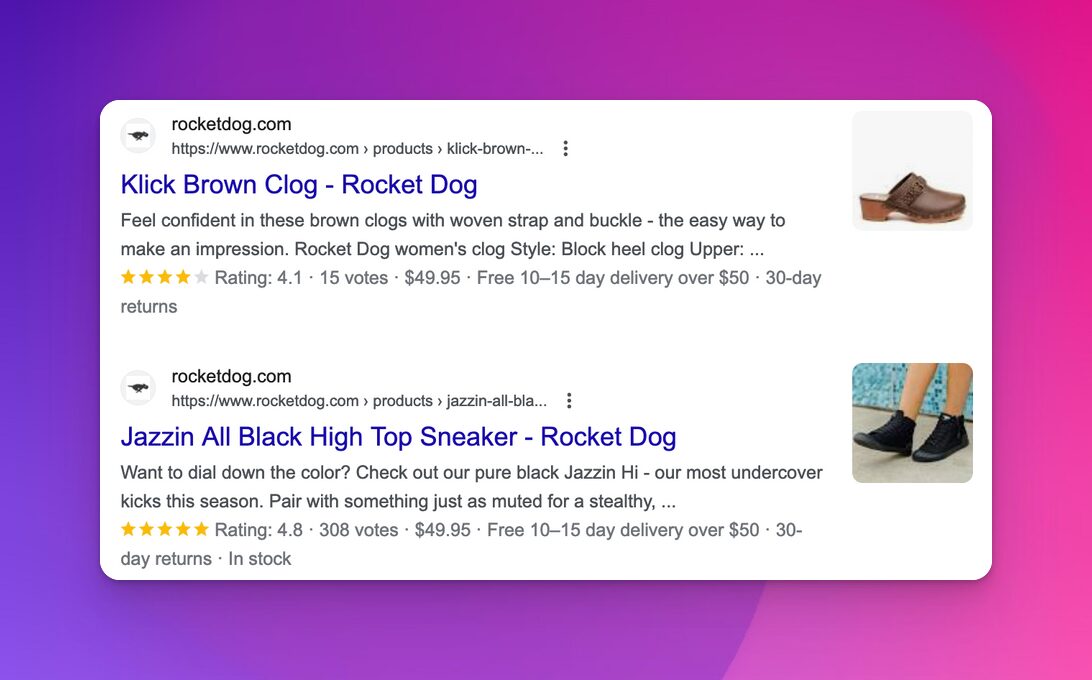
At $399/year, JSON-LD for SEO earns its keep when you have real schema needs and enough reviews, products, collections, and content, local-visibility, or merchant center listing needs to make structured data and rich results pay off.
But even Ilana’s JSON-LD is best for established ecommerce stores that are looking for specific help with structured data or getting products into merchant center’s free listings, not general SEO help. JSON-LD for SEO isn’t what I’d recommend for every Shopify store, or for a smaller Shopify store, unless they’re looking at specific challenges or objectives. Improving your structured data isn’t a single solution to all of your SEO issues and opportunities.
Notice: I recommend this app for a specific job to help you with, not as a magic fix for your Shopify SEO. You should try to think about every paid app that way: “this app helps with this specific job/problem I need to do.”
What to do instead of chasing the latest app
Google (and your customers!) don’t care about what apps you’re running. (Unless they make your store s u p e r slooooooow, but that’s a different issue.)
Google and your customers care about your content, collections, and products. They care about what you’re selling that can help people solve their problems. They care about seeing content on your store that aligns with the questions people are searching for.
So, to capture that opportunity, you should:
- Install Google Search Console and Google Analytics. Seriously! These free tools will help you understand what pages are ranking on your store, the keywords and queries your customers are searching for + that you’re ranking for, and the traffic that the pages on your store are attracting.
- Add another ~5-10 collection pages on your site. Most of the 100+ Shopify stores I’ve worked with benefit from collection SEO and adding more collections. Use a specific SEO title, collection name (headline), and collection description. Find ideas for collections to add to your store by looking at the collections your more established competitors have. Identify the ones that align with your audience and products and positioning, then build similar collections featuring your products. (Here’s my tactical guide to collection SEO, and how to write collection descriptions that rank.)
- Write ~5 blog posts talking about ‘best [product type]’ or ‘how to solve [common problem] with [product type]’ (for the main product that you sell). Go into detail about a question or problem people encounter that they turn to your product for. Talk about the features and benefits that make your product a solution and different from the alternatives. Highlight examples of where customers call out that your product is better than the alternative.
- Find questions in your support emails, online forums, and communities (e.g., Reddit, Facebook groups, X). Look at the questions people ask when considering products and stores like yours. Take those questions as a writing prompt, then write a blog post that answers that individual question. Then post that article answering that question to your site.
Taking those marketing actions consistently will help you grow more-so than any app in the Shopify app store. The above four actions will have you creating relevant content for your audience that’s about your products and collections and that helps your audience with their questions.
That’s the best way to think about growing with SEO. Not, “What SEO app should I use?”, but “What content should I create to help my customers?”
And creating new collections targeting relevant commercial/transactional terms will take you really far. (Here’s why Shopify collections are such a lever for your SEO.)
So, do you need a Shopify SEO app?
Short version: probably not, and definitely not as step 1 to get started with SEO.
Here’s a choose-your-own-adventure to decide what you need:
- Are you a new or growing store? Install Google Search Console and Google Analytics (both free), then go create new collection pages to match what your established competitors have for your product lines. Write half a dozen blog posts answering your most common product questions. Skip the paid SEO apps.
- Are you a bigger store with a specific structured-data or “get my data into merchant center” need? JSON-LD for SEO is the one app I’d point you at, for each of those specific jobs, not as a general “do SEO better” fix.
- Are you tempted by an all-in-one ‘SEO score/optimization’ app that’s having a really good sale on their annual/lifetime license? Ask yourself what that app will actually do for you to take work off your plate beyond giving you an email full of warnings you can probably ignore. Usually the answer is “not much.”
Are you and your store looking for help identifying which specific keywords to target and collections, blogs, and other pages to create to grow your traffic and sales with SEO?
It sounds like you’d benefit from working with me on an SEO Opportunity Report. Or, if you’d rather learn to do your SEO yourself, my video course Shopify SEO Simplified walks you through the SEO strategy and process step by step.
Excelsior!
Kai